Digital SAT Test Day Walkthrough: Hour by Hour
Digital SAT test day runs approximately 2 hours 14 minutes of testing, starting around 8:30 AM at most centers and finishing before noon. The biggest difference from the paper SAT is not the shorter runtime. It is the device: you test inside the Bluebook app, and everything from check-in to score submission flows through that interface. Knowing the exact sequence in advance removes the one variable that no amount of practice can prepare you for.
The question I hear most from students in the week before their SAT is not about strategies or question types. It is about logistics: what to bring, whether the device will work, and what happens if something goes wrong. Those answers are straightforward once you know where College Board documents them. This walkthrough pulls them into one place.
What Do You Need on Digital SAT Test Day?
For digital SAT test day, you need: a charged device with Bluebook installed, a valid photo ID, your admission ticket (printed or as a QR code on a separate device), and your charger. A snack for the break is smart. An approved hand-held calculator is optional since Desmos is built into Bluebook for every Math question.
The Complete What-to-Bring List
College Board's official test day page documents the full requirements. Here is what each item covers:
- Device with Bluebook installed: Mac, Windows PC, iPad, or a school-managed Chromebook. Download and run the Bluebook pre-check at least two days before the test. Installing Bluebook for the first time on test morning creates risks if the pre-check fails.
- Charger: Some test rooms have power outlets, most do not. The device must survive approximately three hours from check-in to finish. Bring the charger regardless.
- Photo ID: A valid government-issued ID (passport, driver's license) or your current school ID with a photo. The name on the ID must match the name on your admission ticket exactly. A mismatch can bar entry.
- Admission ticket: Print it or have the QR code on a device that is not your testing device. If you test on your phone or iPad, you cannot display the ticket on that same screen during check-in. Keep a printed copy as backup.
- Snack and water bottle: Allowed only during the 10-minute break between Reading and Writing and Math. Not permitted during modules.
- Approved hand-held calculator (optional): Bluebook's built-in Desmos handles every SAT Math question. If you bring a hand-held, it supplements Desmos rather than replacing it. College Board publishes the full approved list on the SAT test day page.
What to Leave Behind
Some items are prohibited during testing; others are simply unnecessary and add to your bag weight.
Bring This
- •Device with Bluebook pre-check passed
- •Charger for your device
- •Government or school photo ID
- •Admission ticket (print or QR)
- •Snack and water for the break
- •Approved calculator (optional)
Leave This Behind
- •Phone during testing (keep off, in bag)
- •Smart watch or fitness tracker
- •Bluetooth or wireless devices
- •Scratch paper from home (Bluebook has scratch space)
- •Pencils or pens (not needed)
- •Notes, flashcards, or study materials
Your phone may enter the building but must stay off and out of reach during testing, including during the break. Accessing it for any reason during the exam session can result in score cancellation per College Board policy.
How Does Bluebook Actually Work on Test Day?
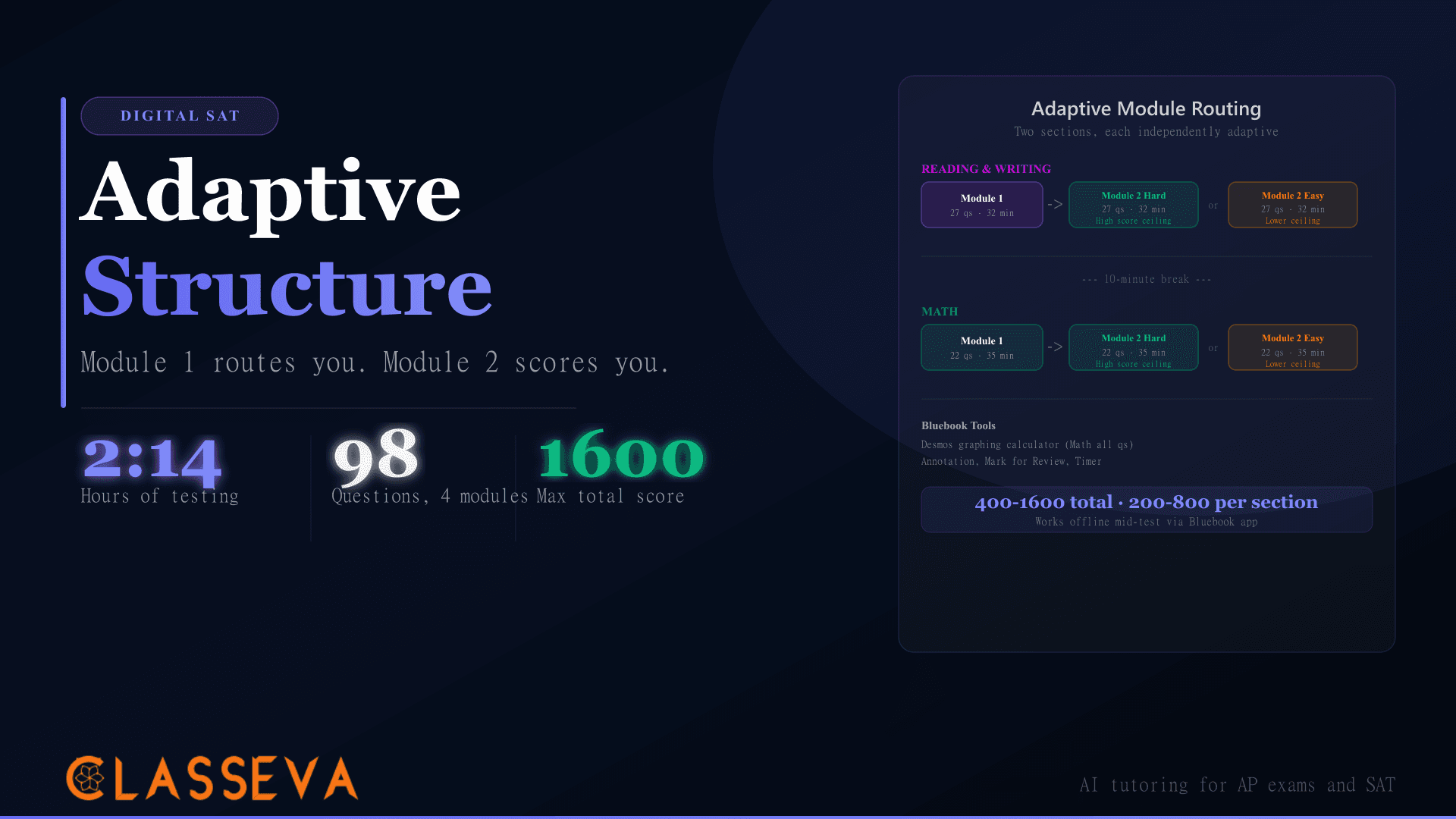
Bluebook is College Board's testing app for the Digital SAT. On test day, you open the app, enter a test room code provided by the proctor, and work through four sequential modules. The app downloads test content to your device before the exam begins, so an internet outage mid-test does not stop the clock or interrupt your questions.
Device Requirements and Setup
Bluebook runs on macOS 11 or later, Windows 10 or later, iPadOS 16 or later, and school-managed Chromebooks. Personal devices must pass the in-app pre-check, which verifies the OS version, confirms the device can enter secure testing mode, and checks that the camera works if your test center requires identity confirmation.
| Module | Questions | Time | Notes |
|---|---|---|---|
| R&W Module 1 | 27 | 32 min | Same for all students |
| R&W Module 2 | 27 | 32 min | Difficulty set by Module 1 results |
| Break | 10 min | Mandatory between R&W and Math | |
| Math Module 1 | 22 | 35 min | Desmos available on every question |
| Math Module 2 | 22 | 35 min | Difficulty set by Math Module 1 results |
Source: College Board SAT Suite structure documentation. Total testing time: 2 hours 14 minutes.
During each module, Bluebook provides a built-in scratch pad, an annotation tool for marking up Reading passages, a “Mark for Review” flag, and a countdown timer in the upper-right corner. You can review and change any answer within the current module before submitting it. Once you submit a module, you cannot return to it.
What If the Center Provides a Device?
Some schools and test centers provide devices for students who do not own one or whose personal device fails the pre-check. If you plan to use a center-provided device, confirm this with your test center before test day. Center devices are typically school-managed Chromebooks or iPads with Bluebook pre-installed and pre-checked. Your test data ties to your College Board account, not the physical device.
The Digital SAT Hour-by-Hour Schedule
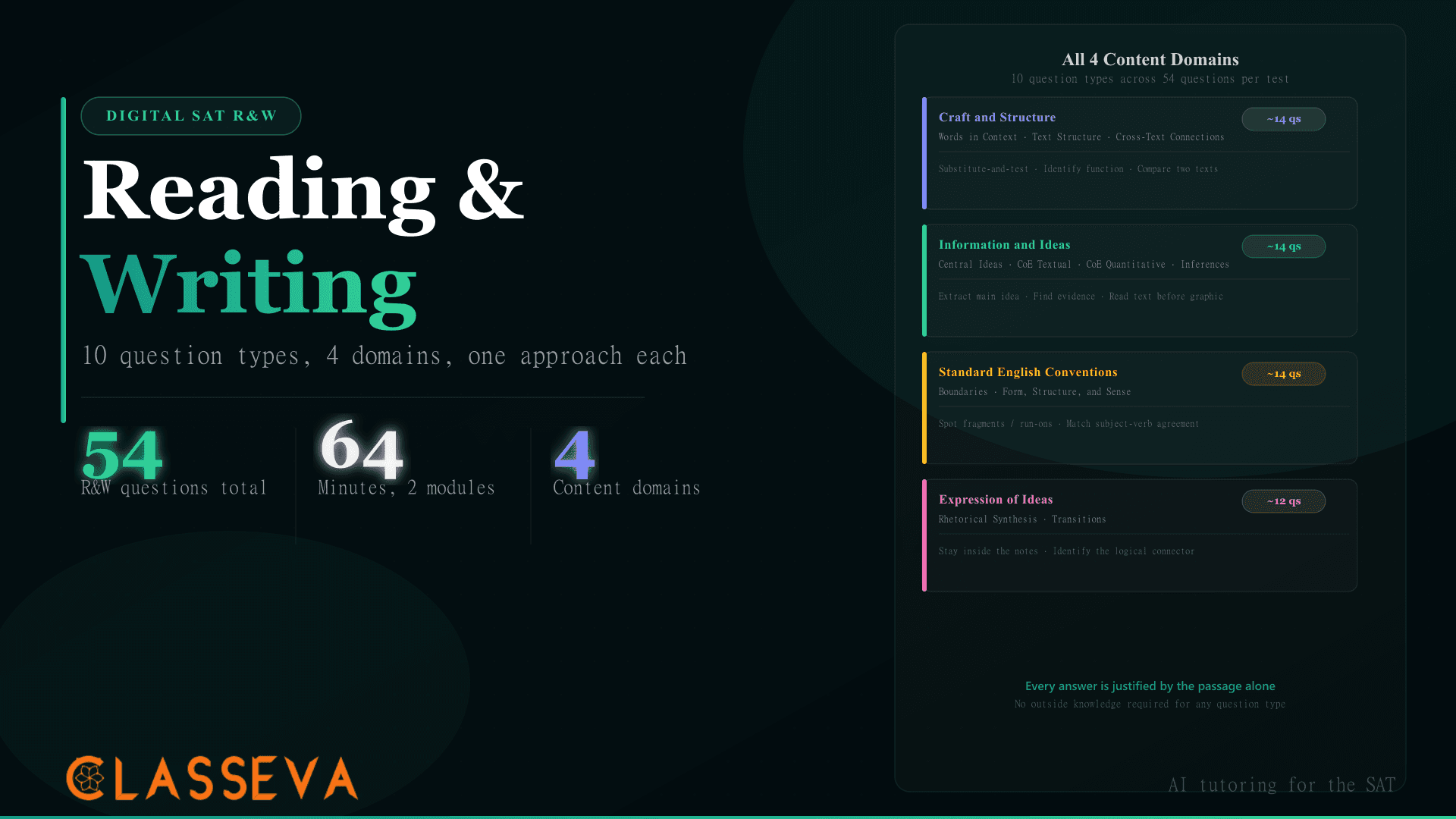
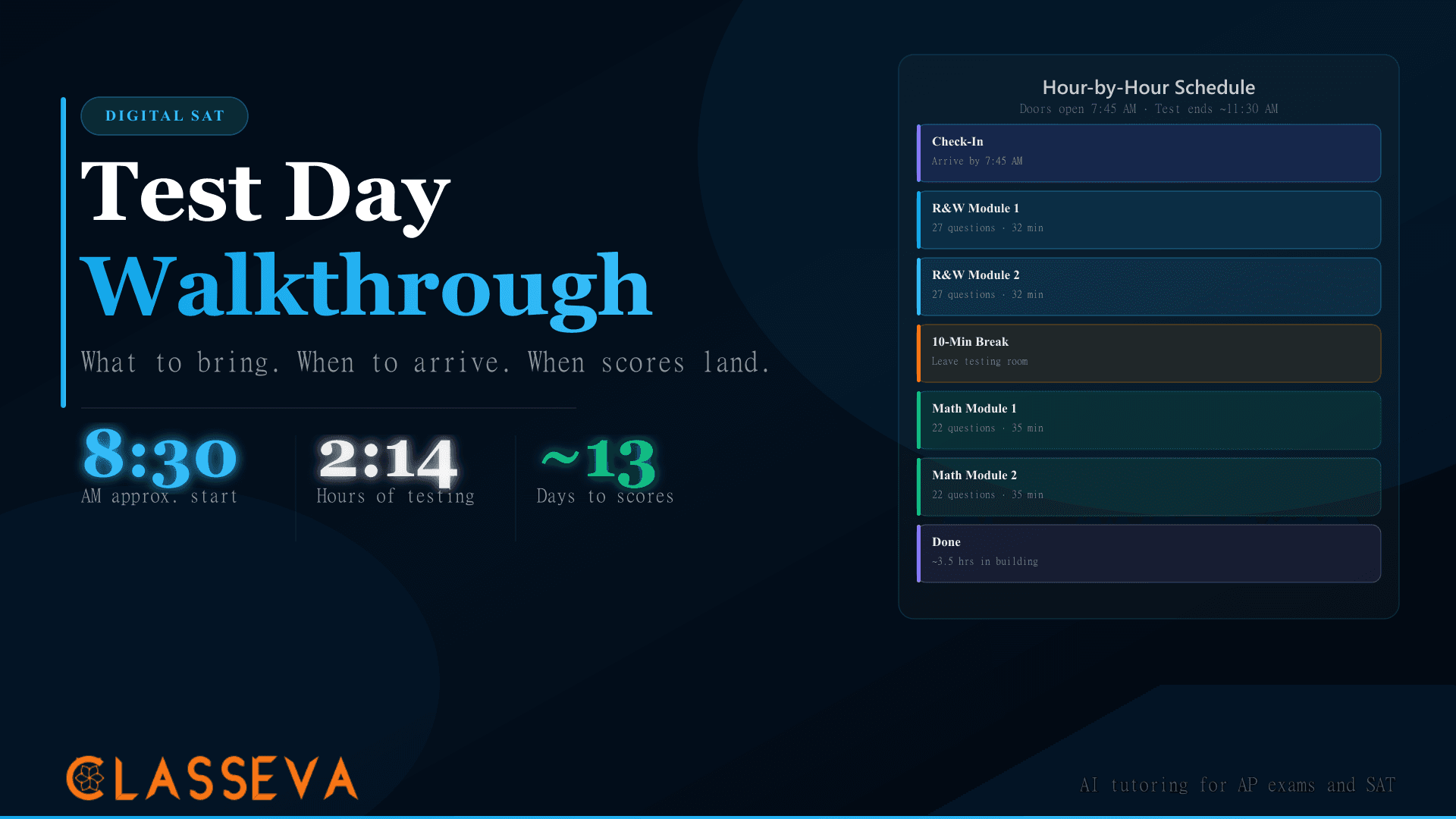
The Digital SAT starts around 8:30 AM at most centers, with check-in opening around 7:45 AM. Reading and Writing runs first across two modules (64 minutes of testing), followed by a 10-minute break, then Math across two modules (70 minutes). Most students finish by 11:30 AM. Total time in the building from arrival to departure typically runs about three and a half hours.
Check-In to First Question
Check-in typically opens around 7:45 AM. Proctors verify your ID and admission ticket, assign you a seat, and give you a test room code. You enter the code in Bluebook to access your exam. Seating and device setup usually take 30 to 45 minutes, which puts most test rooms starting around 8:30 AM.
Arrive earlier than you think you need to. Test centers can turn away students who arrive after check-in closes, and that deadline is firm once testing begins. A late arrival with valid materials has no guaranteed path to rescheduling at no cost.
Module Timing and the 10-Minute Break
Each module counts down independently. You can review and change any answer within the current module before submitting. Once submitted, a module closes permanently: you cannot return to R&W Module 1 after R&W Module 2 begins, and R&W closes entirely when the break starts.
The break runs exactly 10 minutes and is mandatory. Leave your device at your seat. Use the restroom, eat your snack, and return before time runs out. The Math section begins when the break ends, with or without you.
Stand up and move around during the break. Sitting still for 64 minutes of R&W and then immediately starting 70 minutes of Math without a physical reset costs most students a measurable amount of focus. Do not review notes or discuss questions with other students during the break. Proctors monitor the break area.
Calculator Policy: Do You Need to Bring One?
No. Bluebook includes a full Desmos graphing calculator available on every Math question in both modules. Students may also bring an approved hand-held calculator, but it is entirely optional. Students who have practiced with Desmos consistently before test day typically prefer it over a hand-held for graphing, function analysis, and equation solving.
College Board publishes an approved calculator list for students who prefer physical devices. Scientific and graphing calculators are generally permitted; devices with wireless capability, internet access, or QWERTY keyboards are not. If you bring a hand-held, it works alongside Desmos rather than replacing it.
Students who have not practiced Desmos before test day often find it slower than expected under timed conditions. The graphing capability, table function, and equation solver are all accessible but require navigation familiarity. For a full breakdown of how to use Desmos on SAT Math, see our Desmos strategy guide.
What If Your Device Fails or the Network Drops?
If your device dies or freezes during the test, raise your hand immediately and alert the proctor. Test centers carry backup devices. Bluebook saves your progress continuously, so answers up to the point of failure are preserved. The proctor can resume your test on a replacement device without restarting from scratch.
A network drop during testing does not disrupt your session. Bluebook downloads the test content to your device before the exam begins, so the four modules run locally. You need an internet connection to launch Bluebook and to submit when done, but not during the exam itself.
Power outages at the test center are handled by center staff. In extended disruptions, College Board may reschedule affected students. If a significant technical problem affects your testing experience, College Board provides a reporting process through the test day support page. File any report within two business days of the exam.
Alert the proctor immediately for any technical issue: dead device, frozen screen, or unexpected software error. Do not attempt to troubleshoot the device yourself during a timed module. Proctors are trained for device failures and have replacement procedures that preserve your testing time.
The Night Before and Morning of Test Day
Most test-day problems trace back to the night before, not the morning of. A dead device at 7:45 AM, a forgotten ID, or a missing admission ticket each costs time the test schedule cannot absorb. The sequence below addresses the most common causes of morning disruptions.
Night before: charge your device fully
Plug in the device before you sleep and leave it charging overnight. Pack the charger in your bag. Even if the battery shows 100% at bedtime, bring the charger: some test rooms have outlets, and a dying battery mid-test creates a fixable but disruptive situation.
Night before: run the Bluebook pre-check
Open Bluebook and navigate to the device pre-check. Confirm the OS version passes, secure testing mode works, and the camera functions if your test center requires it. A pre-check failure at night gives you time to resolve the issue. The same failure at 7:45 AM does not.
Night before: locate your admission ticket
Print your admission ticket or save the QR code to a device separate from your testing device. If you test on your iPad and plan to show the QR code, that creates a conflict. Print a backup regardless.
Morning: eat breakfast
The Digital SAT runs from approximately 8:30 AM through late morning. Cognitive performance on timed reasoning tasks drops noticeably without adequate nutrition. A snack for the break does not substitute for a real meal before you leave home.
Morning: leave 30 minutes earlier than needed
Factor in traffic, parking, building navigation, and campus crowds. Many test centers share a school campus with other weekend activities. Arriving 15 minutes before check-in opens gives you a buffer for any logistics surprise.
Morning: check your bag before leaving home
Run through the checklist: device, charger, ID, admission ticket, snack. The most common forgotten item is the photo ID, followed by the admission ticket. Confirming at home takes 30 seconds. Discovering the gap at the test center doors takes much longer.
When Do Digital SAT Scores Come Out?
College Board releases Digital SAT scores approximately 13 days after the test date. Scores appear in your College Board account at the same time they are sent to the colleges you designated during registration. The exact release date for each test administration appears on College Board's score release schedule at satsuite.collegeboard.org.
Scores arrive as section scores (200-800 for Reading and Writing, 200-800 for Math) and a combined total (400-1600). Subscores follow a few days after the initial release if they are not available at the same time as your total score.
After scores arrive, your result feeds into your superscore. Colleges that superscore combine your highest Reading and Writing score from any test date with your highest Math score from any test date. A strong performance in one section carries forward permanently. Our Test Score Goal Setter helps you figure out which section to target on a retake. Use the Score Report Send Optimizerto compare your score against each college's published range before deciding who to send it to.
For more on how the Digital SAT's adaptive structure affects your score ceiling, see our adaptive module walkthrough. For the Reading and Writing section specifically, the R&W strategy guide breaks down question types and timing by domain. If you are weighing the Digital SAT against the Enhanced ACT, the PSAT is your first data point: our PSAT guide explains how PSAT scores predict SAT performance.
Plan Your Next Test Date
If you are deciding whether to take the SAT again, test date timing matters as much as score target. College application deadlines, scholarship cutoffs, and score release windows all interact. An October test produces scores in November, just in time for most EA and ED deadlines. A December test produces scores in January, which may miss binding ED but still serves RD.
Optimal Test Date Selector
Enter your target score, current score, and application deadlines to find the best SAT test dates for your timeline.
Key Takeaways
- Install Bluebook at least two days before test day and run the in-app pre-check. A failed pre-check on the morning of the exam has no quick fix.
- Bring a charged device, the charger, a government or school photo ID, and your admission ticket. A snack for the break is smart. A hand-held calculator is optional since Desmos is built in.
- Check-in opens around 7:45 AM; testing starts around 8:30 AM. Late arrivals can be turned away with no same-day remedy.
- The Digital SAT runs four modules (R&W M1, R&W M2, 10-minute break, Math M1, Math M2) totaling 2 hours 14 minutes of testing. Most students finish by 11:30 AM.
- Device failures during the test are handled by the proctor. Alert proctors immediately; do not troubleshoot solo. Bluebook saves progress continuously.
- Scores arrive approximately 13 days after test day in your College Board account, sent simultaneously to colleges you designated during registration.
- After scores release, your result enters your superscore pool. Decide which section to prioritize before scheduling a retake.